
Ning Help Center
  • Home
    • Looking for the Ning 3.0 Help Center?
  • Starting
    • Creating a Network
    • Custom Domains
    • Social Sharing
    • Making Money
    • More >
  • Features
    • Activity Feed
    • Chat
    • Events
    • Forum
    • Groups
    • Photos
    • All >
  • Design
    • The Design Studio
    • Customize Main Page
    • Standalone Pages
    • All About Tabs
    • Developer Mode
    • More >
  • Members
    • Welcoming Members
    • Admins & Roles
    • Members & Privacy
    • Member Profile Pages
    • Paid Access
    • More >
  • Trouble?
    • Troubleshooting
    • Billing Issues
    • Safety Center
    • Contact Us

Current status of the Ning Platform is always available on the Ning Status Blog.

Twitter Facebook
quotes

Verify Your Email Address

Posted by joanna
Share
Tweet

Your email address needs to be verified by you when you join a network.

Go to your inbox and find the email you received from the Ning Network.
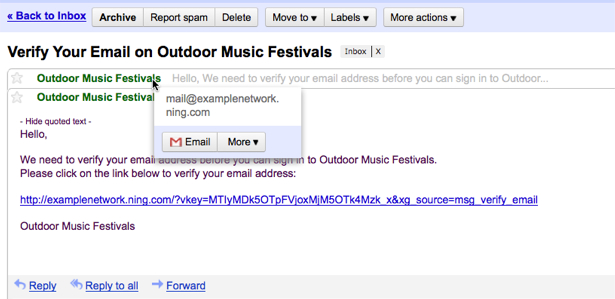
Click on the “Click to Join” verification link in the email you receive. You will be taken to the network’s Sign Up page.

If you didn’t receive an email, check your spam folder. Make sure your email settings allow you to receive mail from the network. Most messages from the network will show up as:

mail@network.ning.com (or mail@network.com)
share@network.ning.com (or share@network.com)
invitations@network.ning.com (or invitations@network.com)
do-not-reply@network.ning.com (or do-not-reply@network.com)

If you receive a message saying this account is already registered or the password is invalid, this means you have created an account with this email address on a different network before. Use the same password you used previously to continue signing up with this same account.

If the email you used to register is invalid or has a typo, you can change it by returning to the “Problems verifying your email address?” page and choosing “Click here to change your email address”.
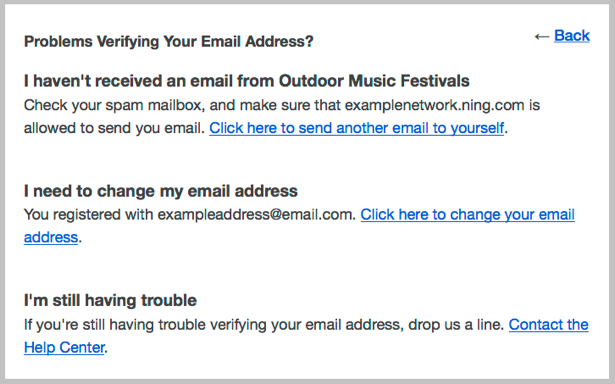
You can also get another confirmation email by returning to the “Problems verifying your email address?” page and choosing “Click here to send another email to yourself”.

If you are still unable to verify your email address after these steps, please let us know and we will be happy to investigate.

Similar Articles:

  • Change Your Email Address During Email Verification
  • Email Verification Help
  • Troubleshoot Sign Up/Sign In Issues
  • Sign Up for a Ning Network
  • Sign Up for an Invitation Only Ning Network
  • Enable Social Sign In with Windows Live
  • Allow Members to Sign Up and Sign In with Other Services

Tags: address, email verification, join, sign up

Author Description

joanna


Comments are closed.

Welcome to Ning 2.0!

This Help Center is for Ning Networks that were created before March 11, 2013. Click here for Ning Networks that were created on or after March 11, 2013 .

Find by Feature

Activity Feed
Add-Ons
Badges
Birthdays
Blog
Chat
Events
File manager
Forum
Gifts
Groups
Invitations
Language Editor
Leaderboards
Messages
Music
Ning Apps
Mobile Version
Notes
Pages
Paid Access
Photos
RSS
Social Sign-In
Text Box
Videos
All Features

Troubleshooting?

Billing Issues
Browser Issues
Domain Mapping Issues
Email Notifications / Invitations
Facebook Sharing App Issues
Facebook Sign In App Issues
Loading Issues
Missing Features and Options
Missing or Deleted Main Page
Ning App Issues
Sign Up / Sign In Issues
Tabs, Pages & Our Apologies
Twitter Issues

Most popular articles

  • Use Your Own Custom Domain
  • Supported Browsers
  • Troubleshoot Browser Related Issues
  • Transfer Ownership of a Ning Network
  • Archive Your Network’s Content
  • Take a Screenshot to Record What You’re Seeing
  • Troubleshoot Domain Mapping Issues

best practices

Whether you’re just getting started or your Ning Network is already up and running, everyone can use a healthy dose of new ideas. We’ve put together some Best Practices studies with examples of how other Ning Networks get people excited and involved. Check them out!

creators

Need some advice? The Creators Network is our customer community, and it’s chock full of interesting tips, ideas, and people who are doing just what you’re doing — building something creative on Ning. All Network Creators and admins are welcome. Join us!

Creators Announcements

  • How are you using member categories in Ning 3.0?
  • Introducing the Spam Folder
  • Now Live: changes to site header and navigation to improve mobile experience for Ning 3.0 Networks
  • Tickets to ForumCon 2013: The Ultimate Event for Anyone Involved in Creating Communities
  • Watch: How to Integrate Events Into Your Community Strategy with Breda Doherty

inspiration

If you’re brainstorming about how to best build and grow your network, browse through some of these outstanding examples of popular social websites. Get inspired!

Ning Platform Status

  • All systems go!
  • Intermittent Errors on Ning.com [Resolved]
  • Intermittent Errors on Ning.com