

You can provide members with administrative tools to help you manage your Ning Network, but without giving them full access to all administrative features on your network. To create different levels of administrators, go to the My Network tab and click on “Management” from the Members section. Once on the Management page, click on “Administrative Roles.”
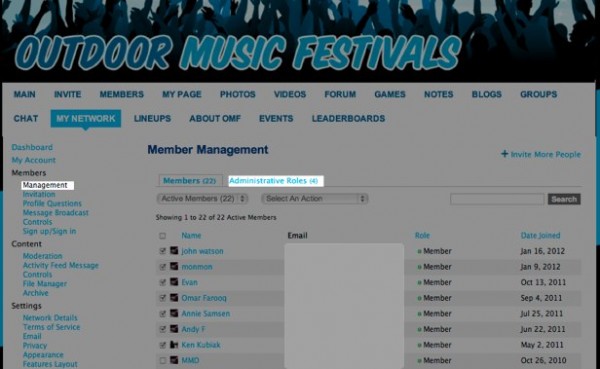
On the Manage Roles page, click “Add a Role.” You’ll see all the different permissions that you can grant to administrators.
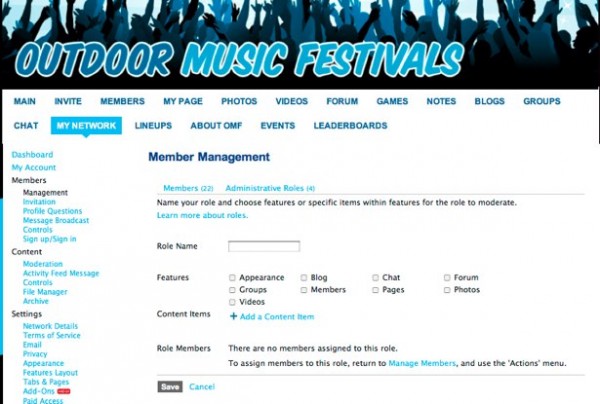
You can appoint a member to moderate a single feature or multiple features.
If you have specific content that you need help moderating — such as a very active forum thread — you can choose an individual content item by URL for the role to moderate. An administrator of a content item can delete comments, remove the item from your Ning Network, and perform other administrative duties.
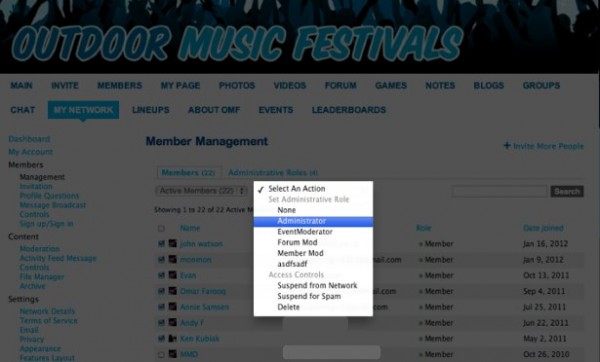
After you have selected the mix of features and content items that you want a member to moderate, click “Save” to create that role. Once the role has been created, you can appoint members to the role back on the Management page. And, to save you time, energy and repetition, you can assign as many members as you’d like to a particular role — and create up to 20 roles.
Here’s the breakdown of the specific permissions you can grant to a role:
Appearance Moderation
- View the My Network tab, but can only see and access the Appearance icon
- Make and save any changes to the Appearance page
Blog
- Approve or deny Blog Posts before they are created if Blog moderation is enabled
- Feature Blog Posts on the Main Page
- Add or delete Blog Post comments
- Add or edit tags on a Blog Post
- Remove Blog Posts
Chat
- Clear messages in the Chat window
- Suspend a member from Chat
Events
- Approve or deny events before they are created if Event moderation enabled
- Feature Events
- Comment on the Event without an RSVP
- Remove Events
Forum
- Ability to view the My Network tab, but they can only see and access the Forum Discussion icon
- Make and save any changes to the Discussion Forum page under the My Network tab
- Start a new Discussion, even if the category doesn’t allow members to start Discussions
- Reply to any Discussion, even if the category doesn’t allow members to reply to Discussions
- Edit Forum settings on the Main Page
- Remove Discussions
- Remove replies
- Close or re-open Discussions
- Add and edit tags
- Feature Discussions
- Change category title
- Change category description
Groups
- Approve or deny Groups before they are created if Group moderation is enabled
- Edit Group
- Manage Group members
- Resend or cancel invitations
- Remove Group
- Send message to Group
- Edit Group’s Text Box
- Start Discussion in a Group Forum
- Add or delete Group comments
- Note: Group Moderators will be listed as Group Administrators in the Manage Group Members page
Members
- Ability to view the My Network tab, but can only see and access the Members icon
- Approve new members of your Ning Network
- Suspend members from your Ning Network
- Reinstate suspended members to your Ning Network
- Delete members
- Feature members
- Resend invitations
- Cancel invitations
Music
- Feature songs
- Edit the playlist on the Main Page Music Player
Notes
- Feature Notes
- Edit Notes
- Remove Notes
Pages
- Edit Pages
- Remove Pages
Photos
- Approve photos before they appear on your Ning Network
- Add and edit tags
- Feature photos
- Rotate photos
- Remove comments
- Remove photos
- Feature albums
- Remove album comments
- Remove albums
Videos
- Approve videos before they appear on your Ning Network
- Feature videos
- Add and edit tags
- Remove comments
- Remove videos
 facebook
  twitter