

Your Ning Network comes with many types of notifications that allow you to receive emails about new activity on your network. You can receive email notifications when you have new private messages, new friend requests, when the Network Creator or group creator sends a broadcast message, when your content is being featured or when a new member joins the network or a group.
You can follow any blog post or forum discussion or category, and by default you’ll follow those you participate in. You can choose whether you want to receive any, all or none of these notifications from you “Email settings” page. You also have full control over who can send you a private message, and can block any member from doing so at any time. Read on for more information on controlling your email settings and messages.
- Private messages
- Ning Network notifications
- Turn off all notifications
Private messages
When you join a Ning Network, you’ll automatically be able to exchange messages with the Network Creator and administrators. In order to exchange messages with any other member, you’ll need to first become friends with that member. When accepting friend requests, keep this in mind. You might not want to accept a person as a friend if you wouldn’t feel comfortable if they contacted you privately.
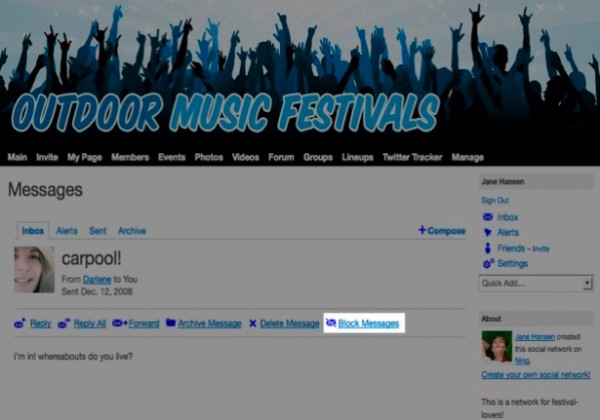
If you’d like to prevent someone from sending you personal messages, you can block messages from that member. To block a sender, go to your inbox and locate a message they’ve sent you. Open the message and click the “Block Messages” link.
Ning Network notifications
There are a number of different types of notifications you’ll receive by default. This includes messages sent to only you, to groups you belong to, to your events, to the whole Ning Network, or messages people sent to all of their friends. Also active by default are the notifications you receive when you have new friend requests, when people you’ve invited become members and when you have new comments to approve.
You can turn off any or all email notifications being triggered by your Email Settings page.
To get to your Email Settings page, click on the “Settings” link in the right column of any page.
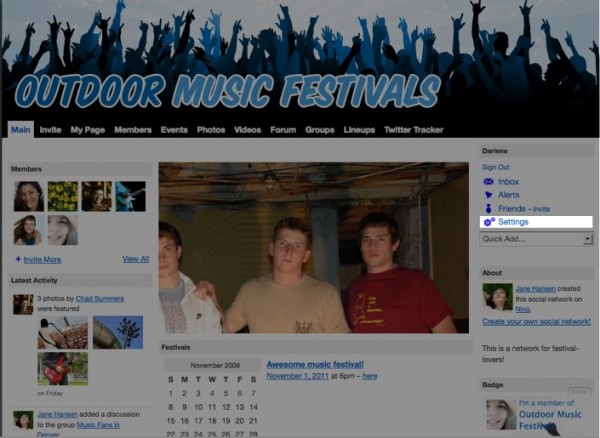
Then, click “Email” on the left. The next page displays all of the different types of notifications you’ll receive.
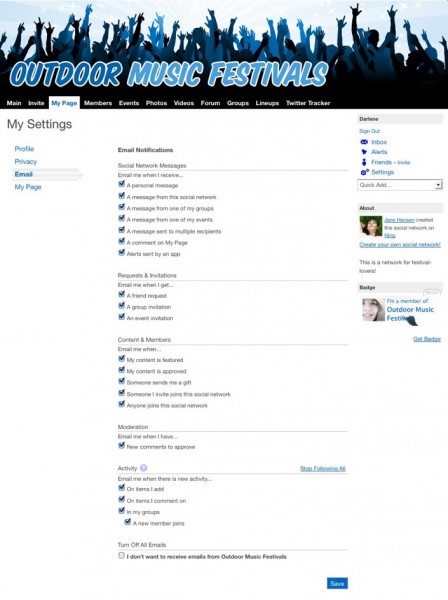
In the “Ning Network Messages” section, you can control the email notifications you receive when messages are sent on your Ning Network.
In the “Requests & Invitations” section, you can control email notifications generated by friend requests, group or event invitations.
In the “Content & Members” section, you can choose whether or not you’d like to receive email messages when your content is approved or featured, when someone sends you a gift, when someone you invited becomes a member or when any new members join.
In the “Moderation” section, if you have turned on moderation for comments on your comment wall or blog posts, you can choose to receive email notifications when someone makes a comment. If you’re a Network Creator, you’ll see additional options here related to moderating content and members.
In the “Activity” section, if you have added new items, you can choose whether or not you’d like to receive email messages when there is activity on them. You will automatically follow discussions or blog posts you add and those you reply to. You will also automatically follow a photo you’ve added, or an event or page you’ve created. You can choose to receive email notifications when there is activity on a group you’re a member of and when a new member joins that group. If you’re already following these items, you can stop following all at once by clicking the “Stop Following All” link.
Turn off all notifications
Finally, if you don’t want to receive any email notifications, you can check the box next to “I don’t want to receive emails from Ning Network Name” at the bottom of the page. Keep in mind this means you will not know when you are sent personal messages until you sign in, and you also will not receive broadcast messages from the Network Creator and administrators. If you decide to receive notifications again, uncheck this box and click “Save” to bring back your previous email settings.
 facebook
  twitter