
Ning Help Center
  • Home
    • Looking for the Ning 3.0 Help Center?
  • Starting
    • Creating a Network
    • Custom Domains
    • Social Sharing
    • Making Money
    • More >
  • Features
    • Activity Feed
    • Chat
    • Events
    • Forum
    • Groups
    • Photos
    • All >
  • Design
    • The Design Studio
    • Customize Main Page
    • Standalone Pages
    • All About Tabs
    • Developer Mode
    • More >
  • Members
    • Welcoming Members
    • Admins & Roles
    • Members & Privacy
    • Member Profile Pages
    • Paid Access
    • More >
  • Trouble?
    • Troubleshooting
    • Billing Issues
    • Safety Center
    • Contact Us

Current status of the Ning Platform is always available on the Ning Status Blog.

Twitter Facebook
quotes

Introduction to Messages

Posted by Ioana
Share
Tweet

Your Ning Network comes with a messages feature to allow you to send and receive messages with other members of the Ning Network without giving out your email address. You can access your inbox and send messages by signing into the Ning Network.
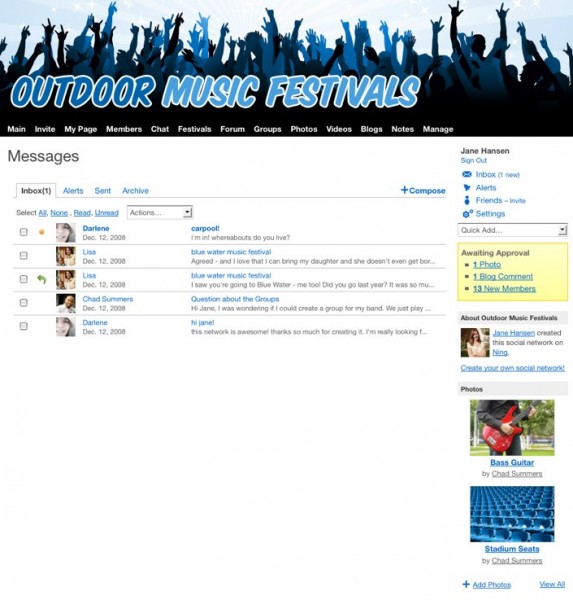
Comments are great for content you don’t mind other people on the Ning Network seeing — like a comment on someone’s profile page thanking them for joining your group, or a comment on a funny video letting the person who uploaded it know you appreciated it. For private information you might not want the whole Ning Network to see — private messages are a great way to go.

Check out the related articles for more information on sending and receiving private messages on your Ning Network.

Similar Articles:

  • Manage Your Friends
  • Control Your Email Settings and Messages
  • Check Your Private Messages
  • Send a Private Message
  • Send a Message to the Guests of Your Event
  • Introduction to Chat

Tags: broadcast messages, messages, private messages

Author Description

Ioana


Comments are closed.

Welcome to Ning 2.0!

This Help Center is for Ning Networks that were created before March 11, 2013. Click here for Ning Networks that were created on or after March 11, 2013 .

Find by Feature

Activity Feed
Add-Ons
Badges
Birthdays
Blog
Chat
Events
File manager
Forum
Gifts
Groups
Invitations
Language Editor
Leaderboards
Messages
Music
Ning Apps
Mobile Version
Notes
Pages
Paid Access
Photos
RSS
Social Sign-In
Text Box
Videos
All Features

Troubleshooting?

Billing Issues
Browser Issues
Domain Mapping Issues
Email Notifications / Invitations
Facebook Sharing App Issues
Facebook Sign In App Issues
Loading Issues
Missing Features and Options
Missing or Deleted Main Page
Ning App Issues
Sign Up / Sign In Issues
Tabs, Pages & Our Apologies
Twitter Issues

Most popular articles

  • Use Your Own Custom Domain
  • Supported Browsers
  • Troubleshoot Browser Related Issues
  • Transfer Ownership of a Ning Network
  • Archive Your Network’s Content
  • Take a Screenshot to Record What You’re Seeing
  • Troubleshoot Domain Mapping Issues

best practices

Whether you’re just getting started or your Ning Network is already up and running, everyone can use a healthy dose of new ideas. We’ve put together some Best Practices studies with examples of how other Ning Networks get people excited and involved. Check them out!

creators

Need some advice? The Creators Network is our customer community, and it’s chock full of interesting tips, ideas, and people who are doing just what you’re doing — building something creative on Ning. All Network Creators and admins are welcome. Join us!

Creators Announcements

  • Content and Community: Webinar with Richard Millington. Join us May 14.
  • Mini Release: CSS classes and bug fixes
  • Ning Spring Cleaning Begins This Week
  • Watch the Webinar: How to Convert Newcomers Into Active Members.
  • New Site & Pages options for Ning 3.0 Networks

inspiration

If you’re brainstorming about how to best build and grow your network, browse through some of these outstanding examples of popular social websites. Get inspired!

Ning Platform Status

  • All systems go!
  • Scheduled Billing System Maintenance Complete
  • Scheduled Billing System Maintenance begins at 10PM Pacific